
Documented observations
Field safety entries stay linked to execution context instead of standalone notes.
We use essential cookies to run the site and optional cookies to improve your experience and measure usage. You can change your choice anytime in Cookie Preferences.
CONSTRUCTION OPERATIONS INTELLIGENCE · SAFETY MANAGEMENT
Log safety observations and inspections against the field record, review advisory signals on recurring conditions, and track corrective actions to a close that safety managers approve.
Documented observations and inspections with corrective actions closed by safety managers, not software.
Product overview
Safety Management connects field observations and inspections to the same operating record as daily execution. Advisory signals highlight recurring conditions for review; safety managers decide what happens next.
Built for Safety managers, superintendents, and field supervisors.
Product proof
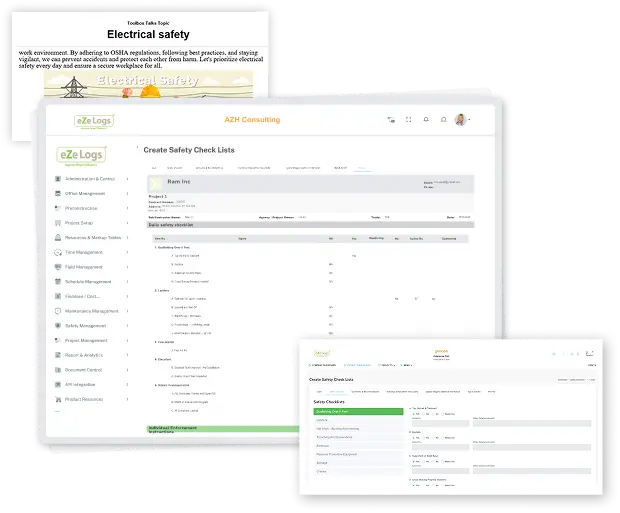
Safety entries stay linked to the project and daily execution context that produced them.
End-to-end workflow
One continuous family — current stage highlighted, full path visible.
Lifecycle position
Who uses this module
Review advisory recurring-condition signals and decide corrective actions and closure.
ExploreLog field observations against the day’s execution record without duplicate entry.
ExploreComplete inspection checklists and flag conditions for safety manager review.
ExploreAI ASSISTANCE — ADVISORY
AI assistance is advisory only. It does not determine regulatory compliance and does not close corrective actions automatically. Safety managers review every signal and every closure.
Inputs
Outputs
Connected modules
Field Management → Daily Reports → Safety → Quality → Photos & Media → Equipment & Assets → Job Costing → Executive Experience
Business outcomes
Field safety entries stay linked to execution context instead of standalone notes.
Advisory signals surface repeated conditions before they escalate.
Corrective actions close only when a safety manager approves them.
Construction examples
Repeated observations on the same condition surface for the safety manager to review and act on.
A supervisor completes a suggested checklist relevant to current activity; the safety manager reviews flagged items.
An open corrective action stays tracked with evidence until a safety manager approves closure.
Evidence & governance
Consequential actions stay with accountable people and role-based controls.
Canonical RFI and Daily Field records remain on the work they support. Ezelogs does not introduce a second write authority.
Keyboard-operable surfaces, clear focus, and readable contrast across the public website.
Public pages stay available while investor-private materials remain access-controlled.
FAQ
No. Ezelogs surfaces advisory observation and inspection signals for review. Regulatory determinations remain with qualified safety personnel.
No. Corrective actions track to closure only after a safety manager reviews and approves them.
Observations and inspections reference the same daily execution record, so safety context is never re-keyed from scratch.
Walk Field Management → Daily Reports → Safety → Quality → Equipment as one governed suite.